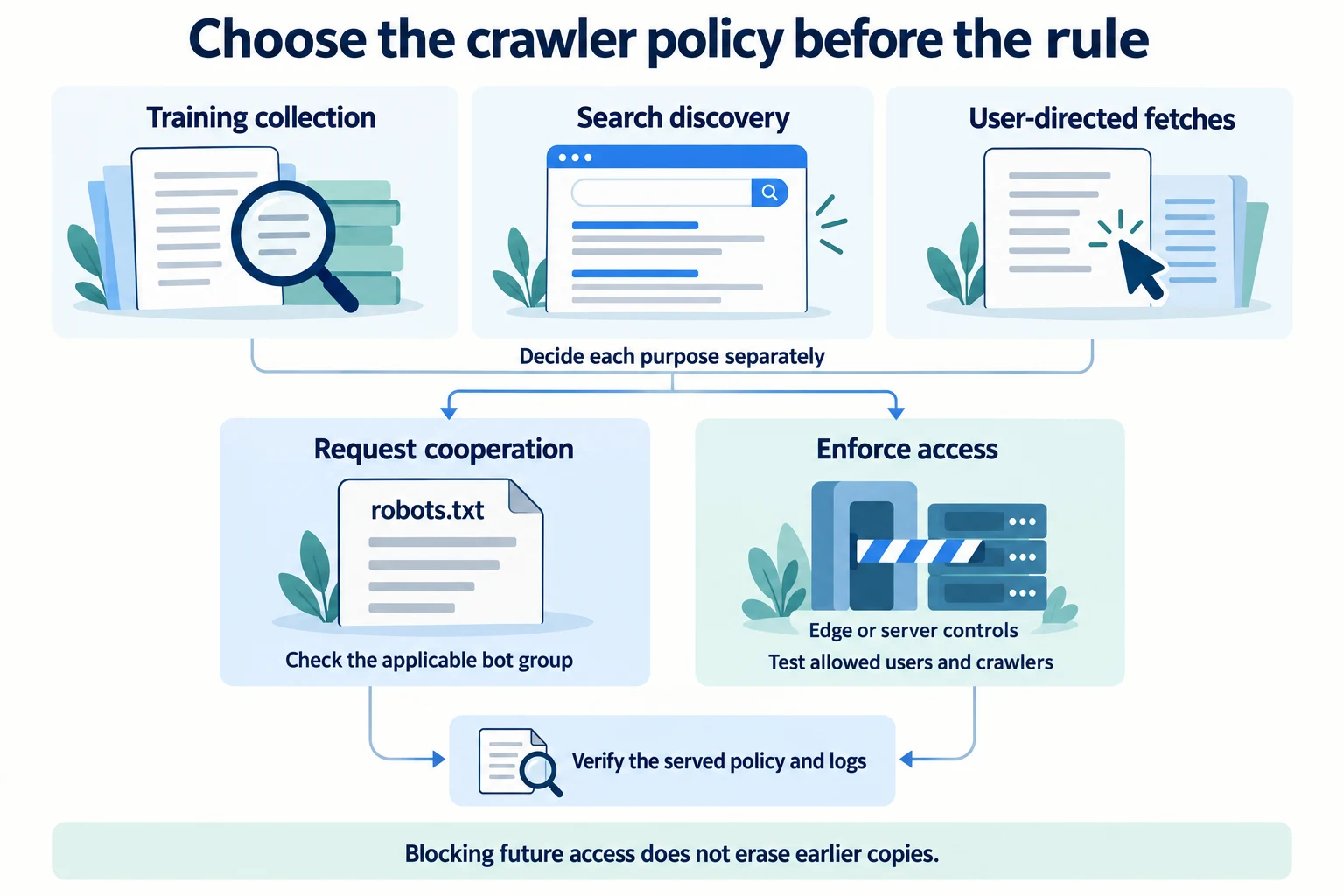
To block AI crawlers, first decide which activity you want to refuse: search discovery, model-training collection, or a fetch initiated by a user. Then target the provider’s documented user-agent token in robots.txt, test which group actually applies, and use a WAF or server rule when refusal must be enforced.
Do not start with a copied “block every AI bot” list. OpenAI, Anthropic, and Perplexity operate bots for different purposes, and several provider controls are independent. A publisher that wants to refuse training but remain eligible for search retrieval should state that choice precisely.
Also do not use llms.txt as a block mechanism. It is a proposed agent-facing content index, not an access-control file. The separate guide to whether you should create an llms.txt file explains that proposal and its limits.
Choose the outcome before writing the rule
“Block AI” can mean at least three different things:
| Intended outcome | Relevant mechanism | What the mechanism does not establish |
|---|---|---|
| Request that a cooperating bot not crawl a path | A specific robots.txt group | Enforced access denial or removal from an existing index |
| Enforce that matching requests cannot reach a path | WAF, CDN, authentication, or server control | Removal from an answer or training dataset already created |
| Limit what Google Search may display | noindex, nosnippet, data-nosnippet, or max-snippet as appropriate | A universal rule for non-Google answer systems |
Training, search, user-directed retrieval, and display are not interchangeable. Start with a short policy sentence such as:
Allow search discovery, refuse model-training collection, and permit user-directed retrieval.
That sentence is specific enough to translate into provider rules. “Block AI crawlers” is not.
The current crawler names and purposes
The following purposes come from provider documentation reviewed on August 28, 2026.
OpenAI
OpenAI documents four crawler controls:
OAI-SearchBotis used for search and to surface sites in ChatGPT search features.GPTBotcrawls content that may be used to train foundation models.ChatGPT-Usersupports actions initiated by a user.OAI-AdsBotvalidates only pages submitted as ads.
OpenAI says each setting is independent. It also says sites opted out of OAI-SearchBot will not be shown in ChatGPT search answers, although they can still appear as navigational links. That is the cost of a search-bot block, not an edge case to hide in a footnote.
Anthropic
Anthropic documents three agents:
ClaudeBotcollects web content that may contribute to model training.Claude-SearchBotsupports search-result quality.Claude-Userretrieves content in response to a user’s request.
Anthropic says disabling Claude-SearchBot prevents search-optimization indexing and may reduce site visibility and accuracy in user search results. It says disabling Claude-User prevents retrieval in response to a user query and may reduce visibility for user-directed web search.
Perplexity
Perplexity distinguishes two agents:
PerplexityBotsurfaces and links websites in Perplexity search results and is not used to crawl content for AI foundation models.Perplexity-Usersupports a user’s requested action.
Perplexity says the settings work independently. That means blocking PerplexityBot does not define a policy for Perplexity-User, and a rule aimed at training collection should not casually be described as a Perplexity search block.
Exact robots.txt directives
Place robots.txt at the top level of each host or subdomain to which the policy applies. A complete refusal for the documented agents would look like this:
User-agent: OAI-SearchBot
Disallow: /

User-agent: GPTBot
Disallow: /

User-agent: ChatGPT-User
Disallow: /

User-agent: OAI-AdsBot
Disallow: /

User-agent: ClaudeBot
Disallow: /

User-agent: Claude-User
Disallow: /

User-agent: Claude-SearchBot
Disallow: /

User-agent: PerplexityBot
Disallow: /

User-agent: Perplexity-User
Disallow: /
That is syntactically explicit, but it is usually broader than the policy a publisher actually wants. It refuses search discovery as well as training collection and requests made on behalf of users.
A more precise example—refuse documented model-training crawlers while allowing documented search crawlers—would be:
# Refuse model-training collection
User-agent: GPTBot
Disallow: /

User-agent: ClaudeBot
Disallow: /

# Allow search discovery
User-agent: OAI-SearchBot
Allow: /

User-agent: Claude-SearchBot
Allow: /

User-agent: PerplexityBot
Allow: /
Google’s separate Google-Extended control is used for training and grounding in some Google systems. It is not the control for whether a page can be eligible as a supporting link in Google Search AI features. Google AI Overviews and AI Mode are Google Search features and are not engines Brandvane samples.
Do not copy the example without confirming that its policy sentence matches yours. The correct file is the one that expresses the organization’s deliberate choice, not the one with the most bot names.
The most-specific-group rule can reverse your intention
Google’s robots.txt specification describes an important parsing rule: only one group is valid for a particular crawler. The crawler uses the group whose user-agent token is the most specific match, and ignores other groups—including User-agent: *. Group order does not matter. Multiple specific groups for the same user agent are combined internally.
Consider this file:
User-agent: *
Disallow: /private/

User-agent: GPTBot
Allow: /
It is tempting to read this as “everyone is blocked from /private/, while GPTBot is otherwise allowed.” Under the most-specific-group rule, GPTBot selects its own group and ignores the wildcard group. Its applicable group allows the whole site, including /private/.
Write the intended restriction into the specific group:
User-agent: *
Disallow: /private/

User-agent: GPTBot
Disallow: /private/
Allow: /
The repeated path is not redundant for GPTBot. It is the rule inside the only group that applies to GPTBot under this parsing model.
This is why appending a bot-specific block to a long existing file requires a full policy review. Check wildcard paths, specific groups, repeated groups, path case, and every host. Do not assume the crawler combines your new block with a helpful wildcard rule elsewhere.
User-initiated fetchers are a separate category
OpenAI says robots.txt rules may not apply to ChatGPT-User because those actions are initiated by a user. Perplexity says Perplexity-User generally ignores robots.txt for the same reason.
That distinction matters when a user asks an assistant to summarize a URL, inspect a page, or perform another direct action. A publisher can express a preference in robots.txt, but the provider’s own documentation warns that the preference may not govern that request.
If access must be refused rather than requested, enforce the decision where requests are served:
- identify the request using the strongest provider-supported network or platform evidence available;
- match the intended bot and path narrowly;
- return a deliberate denial response at the edge or origin;
- retain the security action and request identifier in logs; and
- test that ordinary users and allowed crawlers still receive the intended page.
Perplexity’s crawler page documents WAF allowlisting and publishes IP endpoints. The same WAF mechanism can enforce a deny, provided the match is maintained and scoped correctly. OpenAI publishes separate IP-range files for its documented agents. Anthropic says its bots use service-provider public IPs and does not publish IP ranges, so a raw IP-only rule cannot be treated as equivalent verification.
Do not enforce a broad deny solely from a self-declared user-agent string. User agents can be spoofed. A brittle rule can block unrelated visitors while a requester using another string walks through it.
robots.txt is a request, not access control
RFC 9309 standardizes the Robots Exclusion Protocol. It is a voluntary protocol for cooperating crawlers. It does not authenticate a requester, authorize access, protect confidential material, or stop a client that elects not to comply.
Never put a secret path into robots.txt and assume it has been secured. The file is public and can advertise the path. Confidential or licensed material needs authentication and authorization. Rate-sensitive public material may need edge controls. A robots rule can complement those measures, but it cannot replace them.
Provider updates are not instantaneous either. OpenAI documents that adjustment after a robots.txt change can take about 24 hours. Perplexity says changes can take up to 24 hours. A request observed shortly after publication is therefore not enough to declare the provider noncompliant.
Anthropic supports the non-standard Crawl-delay extension. Use it only when a slower cooperative crawl fits the policy; it is not a substitute for rate limiting when infrastructure protection requires an enforceable ceiling.
Blocking crawling is not removing content
A control should be named for the outcome it can produce.
“Do not crawl”
A Disallow rule requests that a cooperating crawler not fetch the matched path. It does not guarantee that a previously known URL disappears everywhere, and it does not remove copies already obtained.
“Do not use this training crawler”
Provider-specific agents such as GPTBot and ClaudeBot, plus Google’s separate Google-Extended control, express choices about documented training or grounding uses. Those choices are distinct from search discovery.
“Do not display this page or passage in Google Search”
Google’s AI-features guidance explains that noindex, nosnippet, data-nosnippet, and max-snippet affect what Google Search may index or display. Google says a page must be indexed and eligible to show a snippet to be eligible as a supporting link in its AI features; indexing and serving are not guaranteed.
That is a statement about Google Search. It does not define removal behavior for OpenAI, Anthropic, or Perplexity.
If the goal is removal from a provider’s existing output or dataset, consult that provider’s current removal process separately. A new crawl rule and a historical-removal request are different operations.
A safer implementation workflow
1. Inventory the current file
Save the exact current robots.txt for every relevant host. List wildcard and specific groups. Confirm whether a CDN, framework, or deployment process generates the file rather than serving the repository copy you expect.
2. Write the policy in plain language
For each provider, choose search, training, user-directed fetch, and advertising access separately. Record the decision owner and review date. If the policy is “block everything,” record that the search-discovery cost was accepted.
3. Translate the policy into specific groups
Use the provider’s exact tokens. Repeat wildcard restrictions that also need to apply inside a more-specific group. Avoid a giant third-party list whose tokens and purposes nobody has checked.
4. Validate the served file
Fetch the production /robots.txt, not only the source file. Confirm a successful response, plain-text content, the expected host, and no redirect to a different policy.
Record a visibility baseline before the change as well as after it. The free AI visibility check records three OpenAI API answers to questions that include your domain. It can preserve a small pre-change example, but it neither tests unaided discovery nor verifies whether a named crawler can reach a path. Use the served policy and logs to verify access.
5. Test ordinary and bot-specific paths
For every specific group, calculate which group applies and which paths it allows. Include private, staging, search, documentation, and asset paths that differ from the default. A syntax-valid file can still encode the wrong policy.
6. Add edge enforcement only where required
Use maintained network or verified-bot signals, narrow paths, and logged actions. Test false positives. Keep the rule separate from the robots preference so reviewers can tell which mechanism actually denied the request.
7. Observe after the propagation window
Review edge and origin logs after the provider’s documented adjustment period. Separate candidate user agents from verified identities and allowed requests from blocks, redirects, rate limits, and errors.
How to verify the block worked
Check logs, not a search for your brand and not a single assistant response.
The AI crawler analytics guide explains how to preserve request fields, verify identities where possible, and classify outcomes. A useful statement looks like this:
During the disclosed window, retained edge logs recorded no verified requests from the named bot to the blocked path after the policy’s propagation period.
That is still an observation about one retained log source and one window. An absence of requests does not prove universal compliance. The bot may not have attempted the path, logs may be incomplete, the edge may have answered without reaching the origin, or identity evidence may be unavailable.
Conversely, a logged 403 shows an enforced denial at that checkpoint. It does not show that a previous copy was removed or that the URL cannot appear as a navigational reference.
Keep this infrastructure lane separate from sampled answers and AI-referred human visits. The Brandvane measurement method defines those claim boundaries, and the free AI traffic report measures GA4-attributed human sessions rather than crawler requests.
The practical decision
Block the activity your policy actually rejects. If the concern is model training, target documented training crawlers without casually disabling search discovery. If search retrieval is also unacceptable, block it with the explicit understanding that provider documentation describes a visibility cost. If user-directed access must be impossible, enforce that choice at the edge or origin rather than relying on a voluntary file.
Then verify the served policy and the observed requests. Precision here is not administrative fuss: it is what prevents a one-line crawler rule from silently producing the opposite business outcome.